
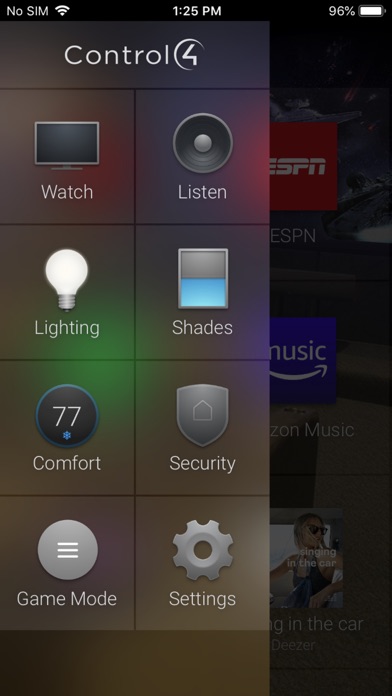

Smart home integration on iOS requires absolute reliability, especially when managing complex lighting, security systems, and high-end media setups. The newly updated Control4 for OS 3 beta brings advanced property automation management directly to your Apple devices.
For smart homeowners and professional installers, testing the latest builds before public release helps identify synchronization issues early. This detailed breakdown covers installation steps, hardware compatibility, and firsthand performance impressions of the newest beta build.
Control4 for OS 3 — Quick Specifications
Developer: Snap One, LLC
About Control4 for OS 3
Developed by Snap One, LLC, this application serves as the primary interface for smart properties running the Control4 Smart Home OS 3 environment. It transforms any iPhone or iPad into a centralized remote management hub for connected hardware.
Users leverage the software to monitor and control virtually every automated element within their residential or commercial property. This includes audio distribution, climate control, automated window shades, and complex security camera grids.
Snap One designed this ecosystem to scale seamlessly from single-room media setups to massive multi-building properties. The underlying architecture relies heavily on localized network communication to ensure rapid response times when adjusting critical devices.
Standout Features & What's New in this Build
The current TestFlight release introduces several user-interface refinements requested by residential integrators and everyday occupants. Navigation feels significantly snappier compared to older stable releases deployed on Apple mobile hardware.
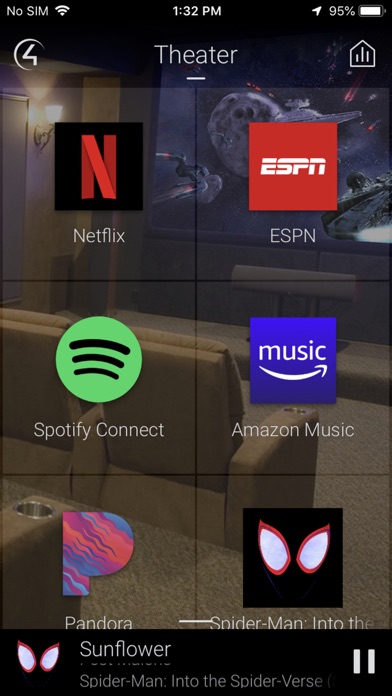
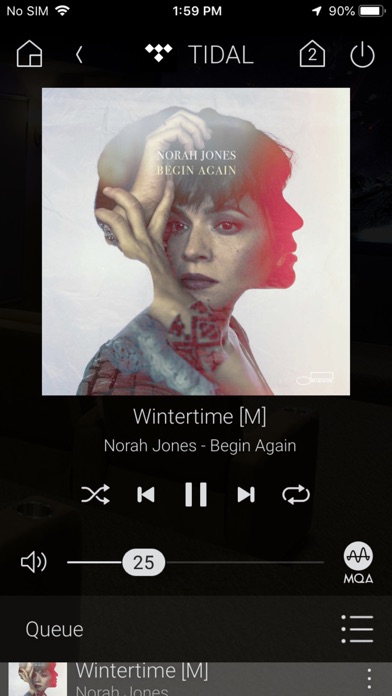
- Active Media Bar: An entirely redesigned persistent media control strip displays currently playing tracks or video feeds with instant volume adjustments.
- Granular Filtering: Quick-toggle filters let you instantly view all active lights, unlocked doors, or open shades across the entire home layout.
- Room Customization: Occupants can independently adjust background wallpapers and prioritize specific device icons for each individual room layout.
- Gesture Navigation: Smooth horizontal swiping gestures allow users to jump instantly between favorite rooms without digging through nested menu hierarchies.
These additions aim to reduce the friction often associated with navigating sprawling smart home dashboards. Frequent users will appreciate the reduction in tap counts required to execute common daily automation routines.
Hands-On Impressions: Performance, Battery, and Thermals
Testing this build on an iPhone 15 Pro running modern Apple Silicon reveals excellent frame pacing and rapid touch responsiveness. Animations glide smoothly at 120Hz on ProMotion displays without the stuttering observed in previous software iterations.
Thermal headroom remains entirely unaffected during extended session use, as the app relies primarily on local network packets rather than heavy local processing. Battery consumption stays minimal, dropping only a negligible percentage even when background camera streaming is left active.
"Smart home interfaces must respond instantly to touch inputs to feel genuinely useful in daily life. This beta build achieves that responsiveness, bridging the gap between physical switches and glass displays."
Network handoff between Wi-Fi access points occurs seamlessly without forcing the application to reload its entire device cache. Minor UI hiccups occasionally appear when switching rapidly between heavy multi-camera feeds, but these clear up quickly.
System Requirements & Requested Permissions
To run this beta build smoothly, your iOS device must be running iOS 15.0 or later. Modern Apple hardware equipped with recent A-series or M-series processors delivers the most fluid navigation experience.
The application requests Local Network access to communicate directly with your household Control4 controller hardware. Notifications permission is also utilized to relay critical security alerts and doorbell pings directly to your lock screen.
Apple sandboxing guarantees that your local automation credentials remain strictly isolated from external data collection vectors. Privacy standards remain consistent with the strict guidelines enforced across the standard App Store ecosystem.
Pros & Cons: Beta Impressions
✓ The Highs (What We Love)
- Responsive Controls: Lightning-fast execution of lighting and media adjustments.
- Active Media Bar: Instant access to audio playback without switching tabs.
- Fluid Animations: Excellent 120Hz ProMotion optimization on supported iOS displays.
✕ Beta Caveats (Room for Polish)
- Camera Feed Stutter: Occasional brief frame drops on multi-camera grid views.
- Dealer Setup Needed: Requires a pre-configured OS 3 compatible home network.
- Slot Availability: TestFlight capacity constraints can occasionally delay access.
Current TestFlight Slot Situation & Availability
Apple enforces a strict limit of 10,000 external testers per TestFlight application build. Because smart home automation enthusiasts frequently adopt these betas early, developer slots fill up rapidly following major update drops.
When active testing windows reach maximum capacity, new users must wait for Snap One to purge inactive testers or push major build expansions. Checking back frequently during off-peak hours remains the most reliable strategy for securing an open slot.
Step-by-Step TestFlight Installation Guide
Installing this beta build requires only a few minutes once you secure an active invitation link. Follow these five steps to get up and running on your Apple device:
1. Download and install the official Apple TestFlight application from the App Store if you haven't already.
2. Tap the official TestFlight invitation link provided on this Codewing discovery page using your iPhone or iPad browser.
3. Accept the beta testing terms and conditions presented on the native Apple TestFlight system prompt.
4. Tap the Install button to download the Control4 for OS 3 beta package directly onto your device.
5. Launch the app, ensure your device is connected to your local home network, and submit feedback via TestFlight if you encounter bugs.
Frequently Asked Questions
Is Control4 for OS 3 safe to install via TestFlight?
Yes, all TestFlight applications must pass Apple's rigorous automated and manual security review processes. The software runs inside a secure iOS sandbox environment, ensuring it cannot tamper with your core operating system files.
What should I do if the Control4 for OS 3 beta is full?
If Apple reports that the beta program is currently full, bookmark this Codewing page and check back periodically. Slots open up automatically when developers remove inactive testers or increase build capacity limits.
Will installing this beta overwrite my App Store version or delete save data?
TestFlight installs beta builds as standalone updates that seamlessly replace any existing public version of the app on your device. Your user preferences, room configurations, and local cache generally persist through the transition.
How long do TestFlight beta invitations and builds last?
Every individual TestFlight build remains active for a maximum duration of 90 days from its upload date. Developers routinely push newer builds before expiration to ensure continuous testing continuity.
Are in-app purchases free during TestFlight beta testing?
Any digital transactions or feature unlocks within a TestFlight sandbox environment are simulated entirely for free. Real payment cards are never charged while testing applications through Apple's beta distribution channel.
Final Editorial Verdict
Snap One has crafted a remarkably stable and polished mobile experience for high-end residential automation enthusiasts. The performance enhancements and streamlined media controls make this beta a mandatory download for anyone managing a compatible smart home.
Developer Support & Official Resources
Stay updated on patch notes, maintenance windows, and feature roadmaps directly from the official developer channels.
Ready to Test Control4 for OS 3?
Apple limits public TestFlight betas to 10,000 testers. Tap below to launch TestFlight and claim your testing slot before capacity is reached.
Join Control4 for OS 3 Beta on TestFlight →





