

Managing paperwork on mobile devices has historically been a frustrating exercise involving printing, signing, scanning, and emailing. Glykka LLC steps into this productivity gap with eSign Tablet, aiming to turn Apple hardware into a streamlined digital contract station. As mobile professionals increasingly abandon traditional desktop setups, tools like this need to function flawlessly under tight business deadlines.
We put the latest open TestFlight build through its paces on modern Apple hardware to see how it handles intensive multi-document workflows. Our testing environment included the latest iPad Pro powered by Apple Silicon paired with an Apple Pencil. This review breaks down what you can expect from the beta, how performance holds up, and how you can secure your download slot right now.
eSign Tablet — Quick Specifications
Developer: Glykka LLC
About eSign Tablet
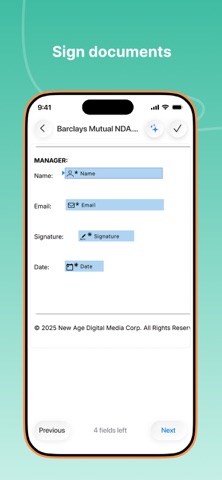
eSign Tablet is designed to be a comprehensive ecosystem for executing legally binding signatures, contracts, and paperwork directly from your iPhone, iPad, and Mac. The core premise revolves around eliminating friction in the agreement lifecycle by allowing users to draw, scan, or import signatures instantly. Beyond basic signing, the application supports assigning specific fields like initials, dates, and checkboxes for multi-party workflows.
Developed by Glykka LLC, the app leverages industry-standard security protocols including strict SSL encryption and compliance with ESIGN, UETA, eIDAS, HIPAA, and SOC2. Users can import and export documents seamlessly across major cloud storage providers like Google Drive, Dropbox, Box, and OneDrive. Glykka has packed enterprise-grade document tracking into a mobile-first interface designed for speed and reliability.
The developer background reflects a deep understanding of mobile software utility, focusing heavily on offline editing capabilities and cross-device synchronization. Whether you are closing real estate deals in person or managing remote vendor contracts via shareable links, the app acts as a centralized command center. The overarching goal is to remove administrative drag from your daily business operations without sacrificing legal validity or data security.
Standout Features & What's New in this Build
This open TestFlight build introduces several refinement patches and workflow improvements requested by early enterprise testers. The development team has optimized the rendering engine for massive PDF documents, ensuring silky smooth pagination and rendering on high-refresh-rate displays. Here are the core standout features currently active in the beta:
- Precision Signature Capture: Draw fluid, vector-smoothed signatures using touch input or an Apple Pencil with zero noticeable latency on ProMotion displays.
- Cloud Storage Sync: Instantly pull documents from Google Drive, Dropbox, Box, and OneDrive with background syncing that prevents data loss during weak network connections.
- Public Signing Links: Generate shareable links and QR codes to collect signatures in bulk for contactless workflows and public-facing documents.
- Advanced Document Templates: Save frequently used contracts as reusable templates to dramatically cut down time spent setting up recurring paperwork.
- Biometric Authentication: Secure sensitive document archives instantly using Face ID or Touch ID authorization upon application launch.
Hands-On Impressions: Performance, Battery, and Thermals
Operating eSign Tablet on current-generation Apple Silicon hardware yields exceptional responsiveness, particularly when dealing with complex, multi-page regulatory documents. Thanks to the fluid frame pacing on 120Hz ProMotion screens, manipulating text fields, checkboxes, and signature blocks feels entirely frictionless. Touch responsiveness is instantaneous, making the Apple Pencil feel almost indistinguishable from traditional pen and paper.
Resource management during prolonged document-signing sessions is remarkably efficient, causing zero noticeable thermal throttling on our test iPad Pro. Battery drain remains minimal even with continuous cloud synchronization enabled in the background, consuming a fraction of what traditional office software demands. Memory management is equally solid, handling large uncompressed PDFs without unexpected crashes or reload loops.
“The shift toward mobile-first contract execution requires hardware-accelerated precision and rock-solid offline reliability. eSign Tablet bridges that gap by delivering desktop-grade compliance inside a fluid, touch-optimized iOS package.”
System Requirements & Requested Permissions
To run the eSign Tablet beta smoothly, your device must be running iOS 15.0 or later, though optimal performance is experienced on modern A-series and M-series chips. The application footprint is lightweight upon initial download, though storage consumption will scale depending on how many local offline documents you cache. iPadOS and macOS Catalyst versions benefit greatly from native pointer support and keyboard shortcuts.
Regarding privacy and permissions, the app requests local network access strictly for cloud storage integration and peer-to-peer document sharing. Apple's strict sandboxing architecture ensures that all your sensitive financial records, scanned signatures, and audit trails remain isolated within the app container. Push notifications are requested solely to alert you when signers complete or view your pending document workflows.
Pros & Cons: Beta Impressions
✓ The Highs (What We Love)
- Fluid Rendering: Instantaneous page scrolling and zero-latency Apple Pencil signature drawing.
- Cloud Flexibility: Native integration with Google Drive, Dropbox, OneDrive, and Box.
- Robust Compliance: Industry-standard ESIGN, HIPAA, and SOC2 legal backing with detailed audit trails.
✕ Beta Caveats (Room for Polish)
- Cloud Hiccups: Occasional manual refresh required when syncing heavily nested folder structures.
- UI Density: Smaller iPhone screens can feel slightly cramped when positioning multiple custom text fields.
- Slot Availability: Open beta slots fluctuate rapidly as Glykka LLC manages testing capacity.

Current TestFlight Slot Situation & Availability
Apple enforces a strict cap of 10,000 external testers per TestFlight application build, meaning developer allocations are treated as prime digital real estate. Glykka LLC has opened public access for this release cycle, but slots are filling up quickly as word spreads across mobile productivity forums. If the official participation link returns a capacity warning, you will need to check back during off-peak hours when inactive accounts are routinely pruned.
Securing your access early guarantees you a front-row seat to upcoming feature drops, bug fixes, and performance patches. Beta testers also gain direct access to feedback reporting tools inside the TestFlight client, allowing you to influence the final App Store release roadmap. Bookmark this page on Codewing to monitor real-time availability updates.
Step-by-Step TestFlight Installation Guide
Getting up and running with the eSign Tablet beta requires just a few minutes of your time using Apple's official testing framework. Follow these five straightforward steps to install the build on your primary device:
- Download TestFlight: Open the App Store on your iPhone or iPad and download Apple's official TestFlight application if you haven't already installed it.
- Access the Beta Link: Tap the official Codewing TestFlight invitation link provided at the bottom of this coverage review.
- Accept the Invitation: Safari will automatically launch and redirect you to the TestFlight interface; tap the "Accept" button to join the public beta.
- Install the Build: Hit "Install" to download the eSign Tablet beta package directly onto your device alongside your stable apps.
- Submit Feedback: If you encounter any bugs during your document workflows, open TestFlight and tap "Send Feedback" to report them directly to Glykka LLC.
Frequently Asked Questions
Is eSign Tablet safe to install via TestFlight?
Yes, absolutely. All TestFlight builds are cryptographically signed by Apple, reviewed through automated security pipelines, and sandboxed securely away from your core system files.
What should I do if the eSign Tablet beta is full?
Apple limits external testing pools to 10,000 users. If capacity is reached, keep this Codewing page bookmarked and check back periodically as inactive tester slots are regularly reclaimed.
Will installing this beta overwrite my App Store version or delete save data?
TestFlight builds operate as standalone preview packages that safely replace or update existing development versions while preserving your cloud-synced document archives.
How long do TestFlight beta invitations and builds last?
Every TestFlight build remains active for a maximum of 90 days from its initial upload date, after which point you will need to update to a newer build via the app.
Are in-app purchases free during TestFlight beta testing?
Yes, all subscription tiers and feature unlocks within the TestFlight environment utilize Apple's simulated sandbox billing system, meaning you will not be charged real currency.
Final Editorial Verdict
eSign Tablet proves that mobile contract management does not have to be a compromise between security and convenience. Glykka LLC has delivered a polished, responsive utility that elevates everyday document workflows on modern Apple hardware. Grab the beta link through Codewing and start streamlining your paperwork today.
Developer Support & Official Resources
Stay updated on patch notes, maintenance windows, and feature roadmaps directly from the official developer channels.
Ready to Test eSign Tablet?
Apple limits public TestFlight betas to 10,000 testers. Tap below to launch TestFlight and claim your testing slot before capacity is reached.
Join eSign Tablet Beta on TestFlight →





